Run popular Pine Script indicators for free, as many as you like
Copy the source of an open-source indicator, paste it into the Goldwick Script editor and add it to your chart. No indicator limit, no ads, no card.
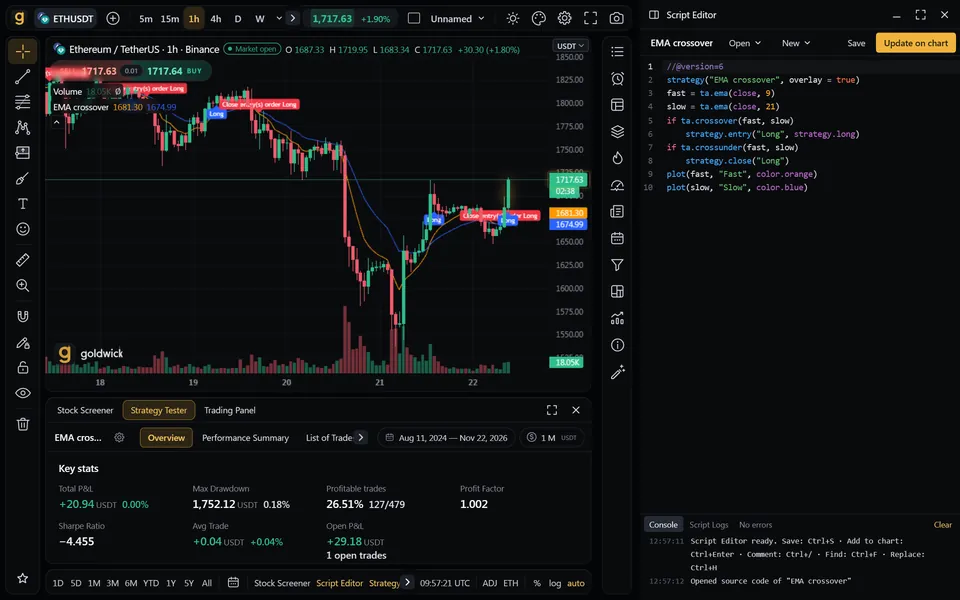
We tested 105 popular open-source indicators
We took popular open-source indicators from TradingView’s public library and ran each one on real market data in Goldwick.
- 101 of 105
- compiled, ran and drew on the chart (96%).
- 100 of 105
- drew correctly when we checked the output (95%).
- 9 of 9
- matched an independent calculation value for value (SuperTrend, Squeeze Momentum, WaveTrend, UT Bot and more).
How to run an indicator in four steps
- Copy the source. On the indicator’s page on TradingView, open the source code and copy all of it. This works for open-source scripts; protected and invite-only ones do not share their code.
- Open the editor. Go to goldwick.app/chart and press Alt+E to open the Goldwick Script editor.
- Paste and add. Paste the code and press Ctrl+Enter. The indicator appears on your chart, with its settings.
- Set alerts if you want. Script alerts work on the free plan, and so do webhooks.
Some of the indicators that ran in our test
Names are the scripts’ titles on TradingView; authors in brackets. Each script keeps its author’s license.
- Squeeze Momentum Indicator (LazyBear)
- WaveTrend Oscillator (LazyBear)
- SuperTrend (KivancOzbilgic)
- UT Bot Alerts (QuantNomad)
- SSL Channel (ErwinBeckers)
- Hull Suite (InSilico)
- Chandelier Exit (everget)
- Trend Magic (KivancOzbilgic)
- AlphaTrend (KivancOzbilgic)
- QQE MOD (Mihkel00)
- VuManChu Cipher B + Divergences (vumanchu)
- Machine Learning: Lorentzian Classification (jdehorty)
- Nadaraya-Watson Envelope (jdehorty)
- ICT Killzones & Pivots (TFO)
- Order Blocks (Flux Charts)
- Price Action Smart Money Concepts (BigBeluga)
- Waddah Attar Explosion V2 (shayankm)
- Williams Vix Fix (theehoganator)
What does not run yet
When something is not supported, Goldwick shows an error with the line number instead of failing silently.
- Some public libraries
- Scripts that import a library Goldwick does not bundle. Popular open libraries (for example jdehorty’s KernelFunctions and MLExtensions) are included.
- A few data requests
request.footprintandrequest.currency_rate.- Special chart types as tickers
- Renko, Kagi and similar tickers built inside a script.
- Protected and invite-only scripts
- Their source is hidden, so there is nothing to paste.
Which Pine Script versions work?
Version 6 and version 5 scripts, and most older ones (v1 to v4), including scripts without a version line.
Do strategies work too?
Yes. Strategy scripts run in the Strategy Tester, which plots the trades and shows net profit, win rate, max drawdown and the trade list.
Is there a limit on how many indicators I add?
No. Add as many as you like to each chart, on up to 16 synced charts.
Are my scripts saved?
Yes. With a free account, your scripts are synced to your account along with your layouts and alerts.
Is Goldwick affiliated with TradingView?
No. Goldwick is an independent project. TradingView and Pine Script are trademarks of their owners.
Paste your first indicator.
Nothing to install, no card. Open it in your browser and try it for 10 minutes without an account; a free account keeps you going.