A free TradingView alternative without the free-plan limits
TradingView’s free Basic plan allows 2 indicators and 30 drawings per chart, and one chart per tab. Goldwick’s free plan has no such caps and shows no ads. It runs in your browser, with nothing to install.
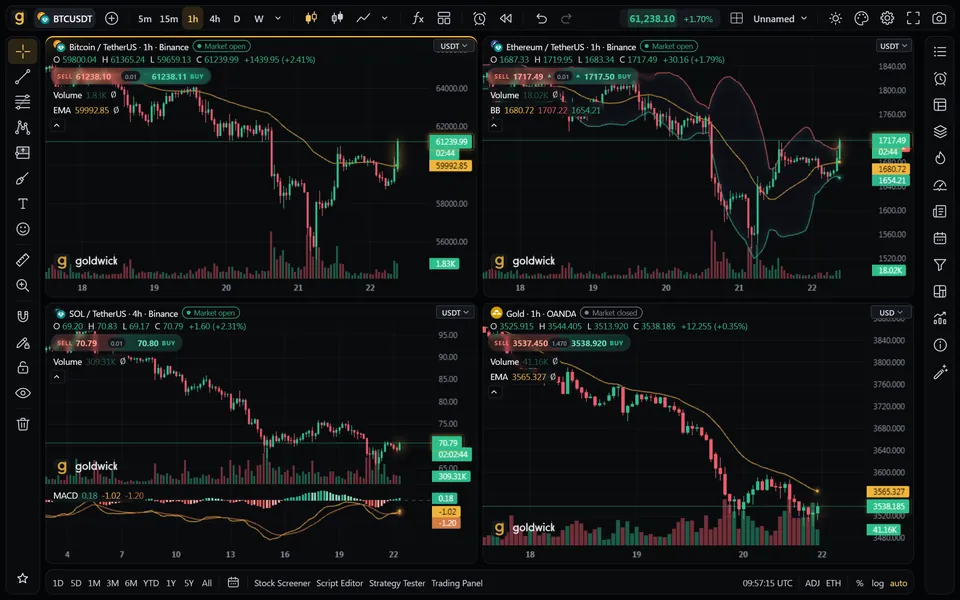
Goldwick free plan vs TradingView Basic
Both plans cost nothing. The difference is what you get before you are asked to upgrade.
| Feature | Goldwick Free plan | TradingView Basic (free) |
|---|---|---|
| Indicators per chart | No limit · 133 built in | 2 |
| Drawings per chart | No limit · 87 drawing tools | 30 |
| Charts on one screen | Up to 16, synced | 1 per tab |
| Saved chart layouts | Synced to your account | 1 |
| Active price alerts | Watched on our server, push to phone | 3 |
| Watchlists | Synced to your account | 1 list, 30 symbols |
| Ads | None | Ad-free is a paid-plan feature |
| Price | $0, no card | $0; paid plans lift the limits |
TradingView figures come from the Basic column of the TradingView pricing page, checked on November 25, 2026. Plans change, so check their page for the latest.
Also on Goldwick’s free plan
- Webhook alerts
- Add a webhook URL to any alert. Our server sends the POST, even when your browser is closed (price alerts).
- Custom timeframes and seconds charts
- Type
7or2Dfor a custom timeframe; seconds charts on crypto. - Goldwick Script and Strategy Tester
- Write indicators and strategies, or paste most open-source Pine Script indicators. See which ones run.
- Crypto Dashboard
- Funding rates, open interest, liquidations and Fear & Greed on one screen.
- Bar replay, screener, heatmap
- Replay the market bar by bar, scan symbols and see the market at a glance.
Where TradingView is still the better pick
Goldwick is young and built by one developer. If you need any of these, TradingView is the right tool.
- Market coverage
- TradingView covers stocks, futures and fundamentals worldwide. Goldwick focuses on crypto, forex, gold, world indices and US stocks.
- Trading with a broker
- TradingView connects to brokers. Goldwick’s Trading Panel is a simulated account; no real-money trading.
- Community and ideas
- TradingView has a huge community, published ideas and the largest public script library.
- Every Pine Script feature
- Goldwick runs most open-source indicators, but not all of them. Scripts that are invite-only or protected cannot be copied, so they cannot run anywhere else.
- Native apps
- TradingView has desktop and mobile apps. Goldwick runs in the browser and installs on your phone as a web app; the Android app is in testing.
Is Goldwick really free?
Yes. The free plan needs no card and shows no ads, and every indicator and drawing tool is included. We may add optional Pro features for heavy users later; what is free today stays on the free plan.
Do I need an account?
You can try the chart for 10 minutes without one. A free Google or email account keeps you going and syncs your layouts, drawings, watchlists, alerts and scripts.
Where does the data come from?
Crypto comes live from the exchanges’ own feeds. If a symbol is delayed, the chart says so clearly.
Can I use my TradingView indicators?
Most open-source ones, yes: copy the source code and paste it into the Goldwick Script editor. In our test, 100 of 105 popular open-source indicators drew correctly. How it works.
Is Goldwick affiliated with TradingView?
No. Goldwick is an independent project. TradingView and Pine Script are trademarks of their owners.
Try it first. Sign up later.
Nothing to install, no card. Open it in your browser and try it for 10 minutes without an account; a free account keeps you going.